So you probably heard that Salesforce is retiring Object and Field-level permissions from Profiles at some point in the future (Spring ’26? Seems optimistic. I expect this date to shift more than a few times). But have you done anything about it? If you’re anything like most of the organizations I’ve worked with, the answer is no.
And that makes sense – it can be difficult to wrap our heads around a shift from Profiles to Permission Sets and Permission Set Groups, but once you make that shift you will wonder why you didn’t do it sooner! Here I’m going to propose a strategy for using Permission Sets which will make your permissions much more manageable, and can help your organization not only make the shift to Permission Sets, but embrace it.
The Basic Strategy
We’re going to embrace the fact that Permission Sets can and should be granular, while Permission Set Groups allow us to bundle permissions in a way that makes it easy to assign. We’re also going to embrace some best practices that we have always applied elsewhere, such as Don’t Repeat Yourself.
- For every object, create 2 basic permission sets, both of which I’ll explain in detail later:
- [ObjectName]: View – Gives View and Edit access to every Field on the object, and Read access to the object
- [ObjectName]: Create/Edit – Gives Create and Edit access to the object (and Read, because it comes with those)
For example, for the Account object, you would create:
- Account: View
- Account: Create/Edit
The View Permission Set
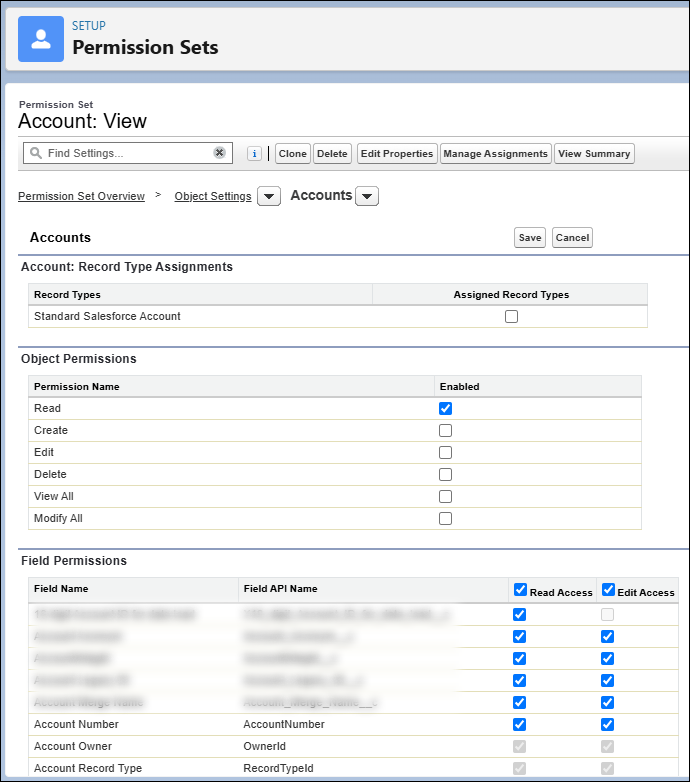
The View Permission Set gives only:
- Read access to all fields on the object
- Edit access to all fields on the object
- Read access to the object
If you have a sensitive field that must be protected specifically, like a Taxpayer Id Number, for example, you might leave that out of this Permission Set and create a Permission Set specifically for those fields (named [ObjectName]: View (Sensitive)), but generally you will have all fields in the View Permission Set.
What happens when this is assigned to a user?
- They will be able to view records
- They will NOT be able to edit records
- They will NOT be able to edit any fields on any record
- They will NOT be able to create a record
I’ll say this again to drive it home – a User that has only this Permission Set assigned to them, which gives Edit access to a field, does NOT give them the ability to edit that field on any record, because they do not have Edit access to the object itself.
This Permission Set will be assigned to EVERY User that has access to this object.
This will be the ONLY mechanism by which you grant view access to this object.
This will be the ONLY mechanism by which you grant access to fields on this object.
Note: Of course, if you need to have a few permission sets for sensitive fields (for example) then you will have a few places, but the idea is that it should be VERY clear which permission set to update if you have to change permissions for or grant access to a given field.
If you’re scratching your head at this point, acknowledge that and move on, it should make sense later.
The Create/Edit Permission Set

The Create/Edit Permission Set gives only:
- Read access to the Object
- Create access to the Object
- Edit access to the Object
We do not include ANY field-level permissions in this permission set! Not now and not ever!
What happens when this is assigned to a user?
- They will be able to view records to which they have access
- They will be able to edit records to which they have access
- They will be able to create new records
Keep in mind that record access is still controlled by regular methods, such as Org-Wide Defaults and Sharing Rules.
Most of your users will be assigned BOTH the View and Create/Edit Permission Sets. This will give them access to create, edit and view records, and the fields that are presented to them will be determined by things like Lightning Record Pages, Page Layouts, etc. You will handle the assignment of Permission Sets by using Permission Set Groups in whatever logical grouping makes sense for your organization.
Possible Permission Set Group strategies include:
- Role-Based Permission Set Groups
- Examples:
- Customer Service Agent
- Call Center Manager
- District Manager
- Examples:
- Capability-Based Permission Set Groups
- Examples:
- Customer Information: View
- Customer Information (Sensitive): View
- Customer Information: Modify
- Customer Information (Sensitive): Modify
- Examples:
Note that the naming conventions follow a specific pattern, this will make finding the right Permission Set Group much easier in the future.
If it makes sense for your organization, you might split the Create and Edit permissions into separate Permission Sets.
You might also create additional Permission Sets, which I hope will be self-explanatory, such as:
- [ObjectName]: View All
- [ObjectName]: Modify All
- [ObjectName]: Delete
Note that the ONLY permission set that includes ANY field-level permissions is the View Permission Set.
This Permission Set will be assigned to EVERY User that can create and edit this object.
This will be the ONLY mechanism by which you grant create and edit access to this object.
Where the Rubber Meets the Road
Ok, here’s where I hope this will all make sense to you, if you’re still scratching your head. Imagine that we add a new field to Account. Where do we need to add it?
One Permission Set only, the View Permission Set. We give Read and Edit access to that one Permission Set.
POOF! Now everyone who can view that Object can see your new field, and everyone who can Edit your Object can edit that field! No more maintenance needed! Additionally, since you have specifically named your permission set [ObjectName]: View, it was incredibly easy to find, right away.
Conclusion
In my opinion, this makes maintenance ridiculously easy, in both large and small orgs. Leveraging the ability to easily assign multiple Permission Sets in Permission Set Groups, combined with granular Permission Sets, following a specific pattern and naming convention, is astoundingly better than Profiles. Reusing the same Permission Set streamlines maintenance remarkably. If a user can see [ObjectName], you know EXACTLY why they can see it – the “[ObjectName]: View” Permission Set, and NO OTHER. No more modifying 12 Profiles when you add a new field, or want to deprecate a Custom Object.
As soon as I implemented it, I wondered why I ever did it any other way!
I’d love to hear thoughts on this, or if anyone has found a better strategy!
 Richard E. Moore Music and Sound Design