Author Archive

Permission Set Strategy

Posted: October 30, 2024 in salesforce
Tags: ,

So you probably heard that Salesforce is retiring Object and Field-level permissions from Profiles at some point in the future (Spring ’26? Seems optimistic. I expect this date to shift more than a few times). But have you done anything about it? If you’re anything like most of the organizations I’ve worked with, the answer is no.

And that makes sense – it can be difficult to wrap our heads around a shift from Profiles to Permission Sets and Permission Set Groups, but once you make that shift you will wonder why you didn’t do it sooner! Here I’m going to propose a strategy for using Permission Sets which will make your permissions much more manageable, and can help your organization not only make the shift to Permission Sets, but embrace it.

The Basic Strategy

We’re going to embrace the fact that Permission Sets can and should be granular, while Permission Set Groups allow us to bundle permissions in a way that makes it easy to assign. We’re also going to embrace some best practices that we have always applied elsewhere, such as Don’t Repeat Yourself.

  • For every object, create 2 basic permission sets, both of which I’ll explain in detail later:
    • [ObjectName]: View – Gives View and Edit access to every Field on the object, and Read access to the object
    • [ObjectName]: Create/Edit – Gives Create and Edit access to the object (and Read, because it comes with those)

For example, for the Account object, you would create:

  • Account: View
  • Account: Create/Edit

The View Permission Set
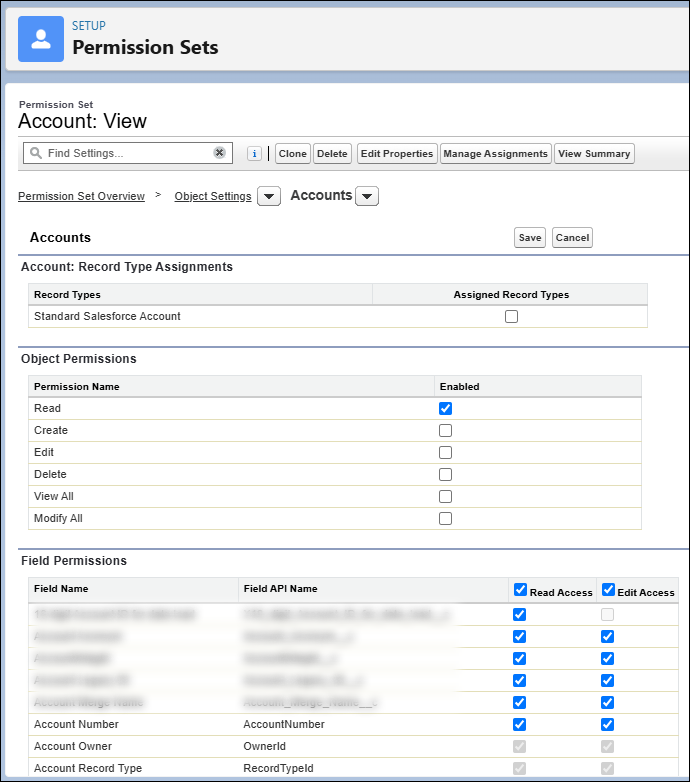
The View Permission Set, which includes Read access to the object, and Read and Edit to all fields on the object.

The View Permission Set gives only:

  • Read access to all fields on the object
  • Edit access to all fields on the object
  • Read access to the object

If you have a sensitive field that must be protected specifically, like a Taxpayer Id Number, for example, you might leave that out of this Permission Set and create a Permission Set specifically for those fields (named [ObjectName]: View (Sensitive)), but generally you will have all fields in the View Permission Set.

What happens when this is assigned to a user?

I’ll say this again to drive it home – a User that has only this Permission Set assigned to them, which gives Edit access to a field, does NOT give them the ability to edit that field on any record, because they do not have Edit access to the object itself.

This Permission Set will be assigned to EVERY User that has access to this object.

This will be the ONLY mechanism by which you grant view access to this object.

This will be the ONLY mechanism by which you grant access to fields on this object.

Note: Of course, if you need to have a few permission sets for sensitive fields (for example) then you will have a few places, but the idea is that it should be VERY clear which permission set to update if you have to change permissions for or grant access to a given field.

If you’re scratching your head at this point, acknowledge that and move on, it should make sense later.

The Create/Edit Permission Set

The Create/Edit Permission Set, which includes Read, Create and Edit access to the object, and no other permissions.

The Create/Edit Permission Set gives only:

  • Read access to the Object
  • Create access to the Object
  • Edit access to the Object

We do not include ANY field-level permissions in this permission set! Not now and not ever!

What happens when this is assigned to a user?

  • They will be able to edit records to which they have access
  • They will be able to create new records

Keep in mind that record access is still controlled by regular methods, such as Org-Wide Defaults and Sharing Rules.

Most of your users will be assigned BOTH the View and Create/Edit Permission Sets. This will give them access to create, edit and view records, and the fields that are presented to them will be determined by things like Lightning Record Pages, Page Layouts, etc. You will handle the assignment of Permission Sets by using Permission Set Groups in whatever logical grouping makes sense for your organization.

Possible Permission Set Group strategies include:

  • Role-Based Permission Set Groups
    • Examples:
      • Customer Service Agent
      • Call Center Manager
      • District Manager
  • Capability-Based Permission Set Groups
    • Examples:
      • Customer Information: View
      • Customer Information (Sensitive): View
      • Customer Information: Modify
      • Customer Information (Sensitive): Modify

Note that the naming conventions follow a specific pattern, this will make finding the right Permission Set Group much easier in the future.

If it makes sense for your organization, you might split the Create and Edit permissions into separate Permission Sets.

You might also create additional Permission Sets, which I hope will be self-explanatory, such as:

  • [ObjectName]: View All
  • [ObjectName]: Modify All
  • [ObjectName]: Delete

Note that the ONLY permission set that includes ANY field-level permissions is the View Permission Set.

This Permission Set will be assigned to EVERY User that can create and edit this object.

This will be the ONLY mechanism by which you grant create and edit access to this object.

Where the Rubber Meets the Road

Ok, here’s where I hope this will all make sense to you, if you’re still scratching your head. Imagine that we add a new field to Account. Where do we need to add it?

One Permission Set only, the View Permission Set. We give Read and Edit access to that one Permission Set.

POOF! Now everyone who can view that Object can see your new field, and everyone who can Edit your Object can edit that field! No more maintenance needed! Additionally, since you have specifically named your permission set [ObjectName]: View, it was incredibly easy to find, right away.

Conclusion

In my opinion, this makes maintenance ridiculously easy, in both large and small orgs. Leveraging the ability to easily assign multiple Permission Sets in Permission Set Groups, combined with granular Permission Sets, following a specific pattern and naming convention, is astoundingly better than Profiles. Reusing the same Permission Set streamlines maintenance remarkably. If a user can see [ObjectName], you know EXACTLY why they can see it – the “[ObjectName]: ViewPermission Set, and NO OTHER. No more modifying 12 Profiles when you add a new field, or want to deprecate a Custom Object.

As soon as I implemented it, I wondered why I ever did it any other way!

I’d love to hear thoughts on this, or if anyone has found a better strategy!

Wordy title, yeah. So here’s the thing: I kept having to spin up tiny little Lightning Web Components (LWC) to show a message on a Lightning Record Page. A few of them I used an Apex controller to do some logic, or lookups, to determine if the message should be shown. But with the advent of Conditional Visibility for Lightning Record Page Components, I wanted to streamline as much as possible.

So here’s a simple solution for most use cases: A Lighting Record Page LWC that displays a configured message, and is shown or hidden based on Conditional Visibility! I’ll be able to reuse this in a number of different areas.

Under Components > Custom

Just drop the “customErrorMessageForRecordPage” component into the page…

Type in the message that you want to display, and set Component Visibility!

BOOM! That’s all you need.

Note, the user must have Read access to the field in order for the visibility to be triggered.

Of course, this implementation is dead simple, so you can go to town with your own CSS, and perhaps passing in additional parameters at configuration time. Sky’s the limit!

Check out the code here: https://github.com/TheMadPope/custom-message-lwc-for-record-page

Happy Salesforcing!

Adding Custom Fields to Salesforce is part art, part science. While we have great flexibility, we also need to be disciplined and cautious – when should we add a new custom field, and when should we use an existing custom field? We have a limit on how many custom fields we can add, and having too many custom fields will cause you a headache for maintenance and data categorization. In fact, having too many custom fields on an object is a very large red flag for a poorly architected solution. This typically indicates not only poorly designed fields, but also scattered data, and likely information being kept at the wrong level – there’s likely some fields there that should truly belong on a related object.

Long story short: Using an existing field is always preferable to creating a new field.

Does a similar field exist on the object?

Can we reuse an existing field?

Often we will get a request from the business to create a custom field that closely resembles an existing field. Too often, a Salesforce shop will simply take that request and implement it directly. Keep in mind that the business users are not the experts in Salesforce architecture – that’s our job as Developers, Admins, and Architects!

Example:

Customer requests to add a new field to Account called “BusinessAccountFocus__c“, which will capture the following values: “Individual”, “Commercial”, “Retail”. These values should appear for Accounts with a Record Type of “Business”. However, we have an existing field called “Focus__c“, which has the values “Individual”, “Family”, “International”. This field is used for Accounts with a record type of “Research Institution”.

In this case we can most likely use the existing field, adding picklist options and restricting the values available by record type. As long as we are not going to capture disparate data in both fields at the same time, we should prefer the more generic field “Focus__c“. Also note that we shouldn’t have a field on an object that is restricted to a given type. In this case, even if we decide that we must have two different fields, we should not call it “BusinessAccountFocus__c” but maybe something more accurate, like “MarketFocus__c“, or even “Audience__c“.

Is this field properly named / categorized for future reuse?

We often get requests from business to add fields that are much too specific. Below are some good and bad examples:

  • 2023_Preferences__c – this is an example of a bad field name because it will obviously only be a valid / appropriate field name for one year. Prefer something like Preferences__c.
  • BusinessAccount_Directions__c – We often get requests like this, because business thinks “we are capturing new data for Business Account records!”. If there is not an existing field for this, we should call this simply Directions__c so that we can POSSIBLY use this field for non-Business Account records.

Question: But what if we will NEVER use this field for non-Business Account records?
Answer: Never say never! Even if that is the case, it is against best practice to have such a specific name on a field. That would be akin to creating a Custom Object called “Accounts_In_Virginia__c” in addition to the Account Standard Object. There may be a valid reason to identify such records, but that is not the appropriate way to do so!

Question: But we already have a field called “2023_Flavors__c”, so it makes sense to have “2024_Flavors__c”, right?!
Answer: No it doesn’t 🙂. The new field should be “Flavors__c” and the old field can slowly expire. We should explore migrating data from the old field to the new, so the old field can be deleted.

Question: But we already have a field called “NW_TemplateText__c”, so it makes sense to have “SW_TemplateText__c”, right?!
Answer: No it doesn’t 🙂. The new field should be “TemplateText__c” and the old field can slowly expire. We should explore migrating data from the old field to the new, so the old field can be deleted.

Please also make sure to reference your team’s Naming Conventions for related information!

The items above are intended to be guidelines only. As ever, consult with the team (and your friendly neighborhood architect) if you are having any issues or confusion! It’s up to all of us to keep our Orgs in good working order!

Blog Outdated

Posted: June 18, 2024 in whutnot
Yeah, I get it. This blog is outdated. Heck, the whole concept of a blog is outdated. Good news is, I don’t even make an effort to keep it up to date, so joke’s on all of us!

Posted: June 18, 2024 in whutnot

you’re like my oxygen: plentiful, volatile, highly flammable, and i’d need to cram you into a pressurized container if i were to survive in space (or under water).

OK, so this post is a variation from the normal (which around here, is silence, ironically enough). Because I wanted to share with those that care a handy pattern that I came up with which dramatically improved my life as a Microsoft Dynamics CRM developer. If you’ve done custom plugin development, you’ve probably come across this horrible monster:

 public void Execute(IServiceProvider serviceProvider) {
    var context = (IPluginExecutionContext)serviceProvider.GetService(typeof(IPluginExecutionContext));
    var factory = (IOrganizationServiceFactory)serviceProvider.GetService(typeof(IOrganizationServiceFactory));
    var service = factory.CreateOrganizationService(context.UserId); 

    if (context.InputParameters).Containst("Target") && context.InputParameters["Target"] is Entity
    {
        //Do things
    }

Which is a horrible, ugly, messy pattern. It is bad and you should feel bad for using it. Now of course, you can’t have static member variables in a plugin, but don’t let that turn you to the dark side. Instead, I introduced a class called PluginHelper.

 public void Execute(IServiceProvider serviceProvider) {
    var p = new PluginHelper(serviceProvider);

The PluginHelper uses the ServiceProvider in its constructor to populate its member variables, which include the Context, Factory, Service, TracingService, all that good stuff. You can also stop repeating yourself and write common functions as methods on the PluginHelper class, so that A) You can stop all that dang typing, and B) your plugin development will become more efficient in time – If you find yourself repeating a function in multiple plugins, move that function to a method on the PluginHelper!

Even better, most of the time, you can just pass the PluginHelper to your methods, making your signatures much cleaner.

Some of the things that I’ve done include…

//BEFORE:
if (context.InputParameters).Containst("Target") && context.InputParameters["Target"] is Entity
    {
        //Do things
    }
//AFTER:
var target = p.GetTargetEntity();
if (target!=null)
{
    //Do things
}
//BEFORE:
if (target.Contains("AttributeName") && target["AttributeName"]!=null)
    {
        //UGH THIS IS THE WORST AND YOU REPEAT IT A MILLION TIMES
    }
//AFTER:
if (p.HasValue(target, "AttributeName")
{
    //I feel like I just brushed my teeth in the shower!
}

And one of my favorites, because you see it so dang often:

//BEFORE:
if (target.Contains("AttributeName") && target["AttributeName"]!=null)
    {
        otherEntity["OtherAttributeName"] = target["AttributeName];
        //Ok, this is just compounding your mistakes...
    }
    else
    {
        otherEntity["OtherAttributeName"] = null;
    }
//AFTER:
p.SetAttributeValue(target, "AttributeName", otherEntity, "OtherAttributeName", true);

In case you were curious, the signature of SetAttributeValue is:

 public bool SetAttributeValue(Entity sourceEntity, string sourceAttributeName, Entity destinationEntity, string destinationAttributeName, bool nullIfNotProvided)

I’ve listed some other methods/members within the PluginHelper below, but I won’t go into detail on them unless you ask real nice. You can probably guess what they do.

  • GetPreImage
  • AllowTracing
  • PrimaryEntityName
  • MessageName
  • TraceEntity
  • HasAttribute
  • GetCompositeEntity

Anyway, I hope this helps SOMEONE out there make more sense of their custom plugin code. I know that it’s saved my sanity multiple times.

She had legs.

Posted: January 14, 2016 in whutnot

She had legs that went all the way down. That is, she wasn’t floating or anything. There wasn’t like a weird supernatural gap between her ankles and her legs. Nope, they just kept going, hip to ankle. All the way down.

All the way up, too, like some kind of biological creature evolved over the ages to ambulate in an upright, bipedal fashion. She walked as though she was born that way.

From the way she carried herself I could tell that she had a spine, some kind of interconnected network of bones that held her rib cage in place, protecting what must have been some kind of cranium, since her eyes took in the room, denoting intelligent (or at least organized) thought.

She opened her mouth to speak, parting perfect lips – They were red, as though the flesh was kept constantly moist by some kind of saliva or other lubricant. I knew her type – She would use her teeth to separate out little pieces of organic material, crushing them between bone masses embedded in her jaw. Yeah, I’d dealt with her kind before. It was only a matter of time before she would need to feed again, breaking down that organic material with some kind of enzymatic and microbial stew in a series of fleshy sacks within her body.

When she spoke, the sound was like air being pushed from a million tiny flesh-balloons, vibrating carefully controlled muscles somewhere in the column of meat that supported her head.

It gave me chills.

I’d never been so aroused.

2015 Updates!

Posted: January 18, 2015 in whutnot

What’s new with me? Well, I did design for The Reformers‘ “The Turn”, an original adaptation of The Turn of the Screw, just opened Sidekicks with Action Adventure, and am currently in early design/creation meetings for an original show with the Reformers. May possibly have news about new music projects this year, but I’ll hold off until there’s more tangible news.

If you’re reading this, why haven’t you downloaded my stuff yet? It’s free! I mean, I won’t stop you from donating, but still. Click that MUSIC link in the upper right, why dontcha?

Maleficia and the Drammy Awards!

Posted: May 30, 2014 in whutnot

I’m ALSO super-duper-stoked that String House Theatre‘s devised piece Maleficia is a finalist for a Drammy Award for Devised Work! Bursting with gratitude to have worked on such cool projects. Listen to the album of all original music composed for the show by yours truly! Available FREE, or name your own price!!!

maleficia_cover_lg

Revenants and the Drammy Awards!

Posted: May 30, 2014 in whutnot

I’m super-duper-stoked to announce that I’ve been nominated for a Sound Design Drammy Award for The Revenants, which ran last year, put on by The Reformers. A complete honor just to be nominated in the presence of other great finalists. Go Portland theater!! Want to hear what the buzz is about? YOU CAN! Download for free (or donate) here:

Revenants_Cover[1]